
How to add Lucky Vaults to your iPhone home screen
On iPhone, Lucky Vaults works like an app straight from your home screen, with alerts when your coins load or your cashout is paid.
Step by step
Open luckyvaults.vip in Safari
Tap the menu button next to the address bar.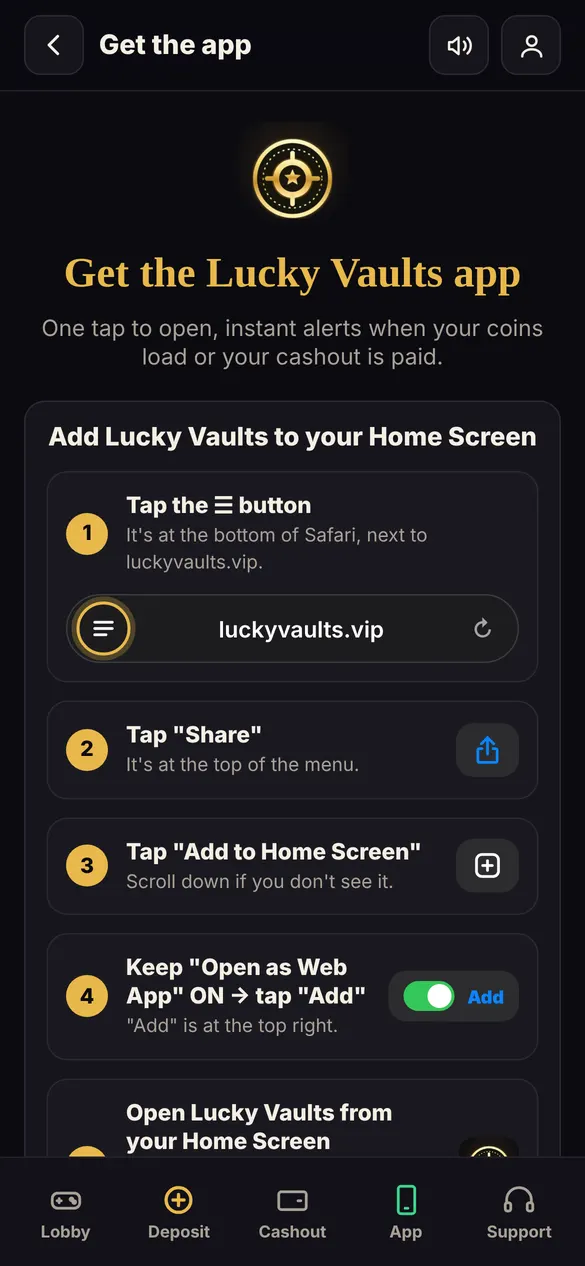
Tap Share, then Add to Home Screen
Keep "Open as Web App" on and tap Add.Open it from your home screen
Turn on notifications so you never miss an update.
Questions
Is there an Android app?
Yes. Open luckyvaults.vip/app on Android to install it.
More guides
How to sign up on Lucky Vaults How to deposit on Lucky Vaults How to cash out on Lucky Vaults How to get your Free Play on Lucky Vaults Invite friends to Lucky Vaults